Tag Archives: Fusion AI Lab Kit

AI on the Edge LESSON 10: Make Your Raspberry Pi Listen to You with Voice Commands

In this video lesson you will learn how to train the Raspberry Pi to take voice commands from you. We do this through the Fusion AI+ hat’s microphone, and a Speech to Text (STT) model. Our goal is to develop the ability to interact with our projects through spoken words. We give commands to the project, and then it responds intelligently with words.

Remember these lessons depend on you using the AI Educational OS, a special version of bookworm that has all the libraries, modules, and models already installed for you. See LESSON #2 in this class for instructions on flashing that OS.

Below is the simple demonstration code we developed to give simple voice commands:

Similar to our Speech to Text example, the first time you run this program you will get a permissions error. You need to open a terminal, and put these commands in one at a time to enable permissions. This only has to be done once, and after that this and all STT programs should run properly.


AI on the Edge LESSON 9: Make Your Raspberry Pi Talk with TTS

In this video lesson I show you how to make your Pi Project talk to you using Text to Speech (TTS). We will use the Piper Model which gives good clear voice, and a choice from a large number of different models.

In this lesson I show you my solution to the Homework assigned in LESSON #8.

In this lesson we demonstrate this program, which makes the Pi talk, through the Fusion HAT+ speaker. The homework was to create a program that smoothly adjust the brightness of an LED using a potentiometer. The project was also to speak to the user, indicating what brightness the LED was set at.

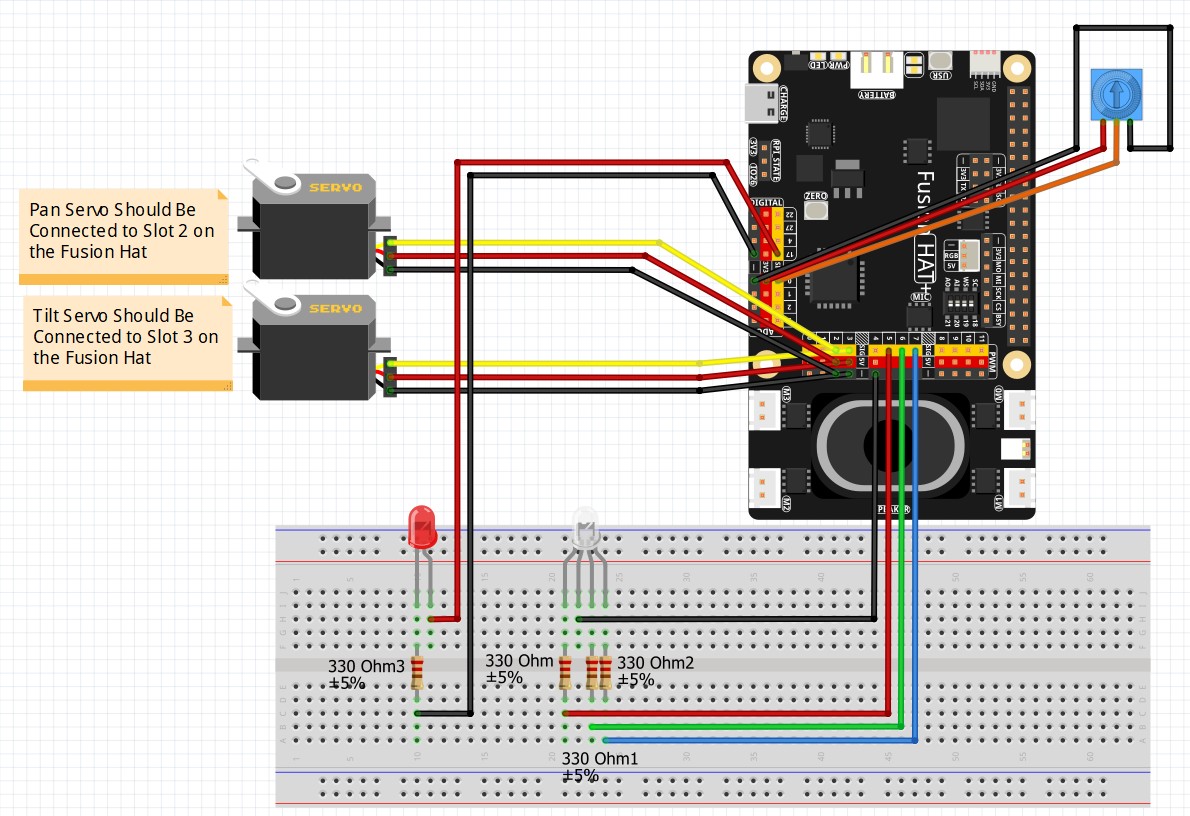
This is the schematic we are using on these projects;

Fusion Hat Circuit Diagram
This is the circuit we will use moving forward in the class

This Schematic is explained in detail in LESSON #5.

Then this is the code we developed in today’s lesson.


AI on the Edge LESSON 7: Homework Solution for Dimmable LED

In this video lesson we present the solution to the homework assignment given in LESSON #6.  Your assignment was to create a dimmable LED where the brightness of the RGB LED is controlled by the potentiometer. We are still using the schematic from our earlier project.

Fusion Hat Circuit Diagram
This is the circuit we will use moving forward in the class

In this lesson, this is the code which we came up with:


AI on the Edge LESSON 1: Introduction and Class Overview

Welcome to our all new AI on the Edge class! I will need you to buckle up, get your hardware together, and get ready to teach AI who is boss! We will be using a Pi 5, and the Fusion AI Lab kit. I will show links to the hardware below. In today’s lesson I describe the Class Introduction, and will show you some demos of the types of projects we will be doing. You will either Drive AI or your will be Destroyed by AI. Don’t be one of the ones who will be eaten by it

The Future will Belong to Those Who Can Drive AI

Guys, get your gear, and make sure you end up on the right side of the Dystopian future that awaits the world.

I have provided Amazon links, so you can order everything in the same place

You Will need a Raspberry Pi 5
Order Pi 5

You will need a heat sink and fan
Order Heat Sink and Fan

You Will Need the Fusion AI Lab Kit
Order Fusion AI Lab Kit

You Will Need a 25 Watt Power Supply
Order Power Supply

You Will Need a Micro HDMI Cable
Order Micro HDMI Cable

You Will Need a Keyboard and Mouse
Order Wireless Keyboard and Mouse

OK, get Geared Up with the equipment above, and then next week’s lesson will show you how to configure your pi 5 for this class.