# ====================================================================
# DISCLAIMER:
# This code is provided as-is for educational and experimental
# purposes only. The author makes no representations or warranties of
# any kind concerning the safety, suitability, or accuracy of this
# code. Use at your own risk. The author assumes no liability for any
# damages, system failures, security breaches, or network issues
# resulting from the use or implementation of this script.
# ====================================================================
# Import required computer vision, system, math, and hardware libraries
import cv2
import time
import numpy as np
import colorsys
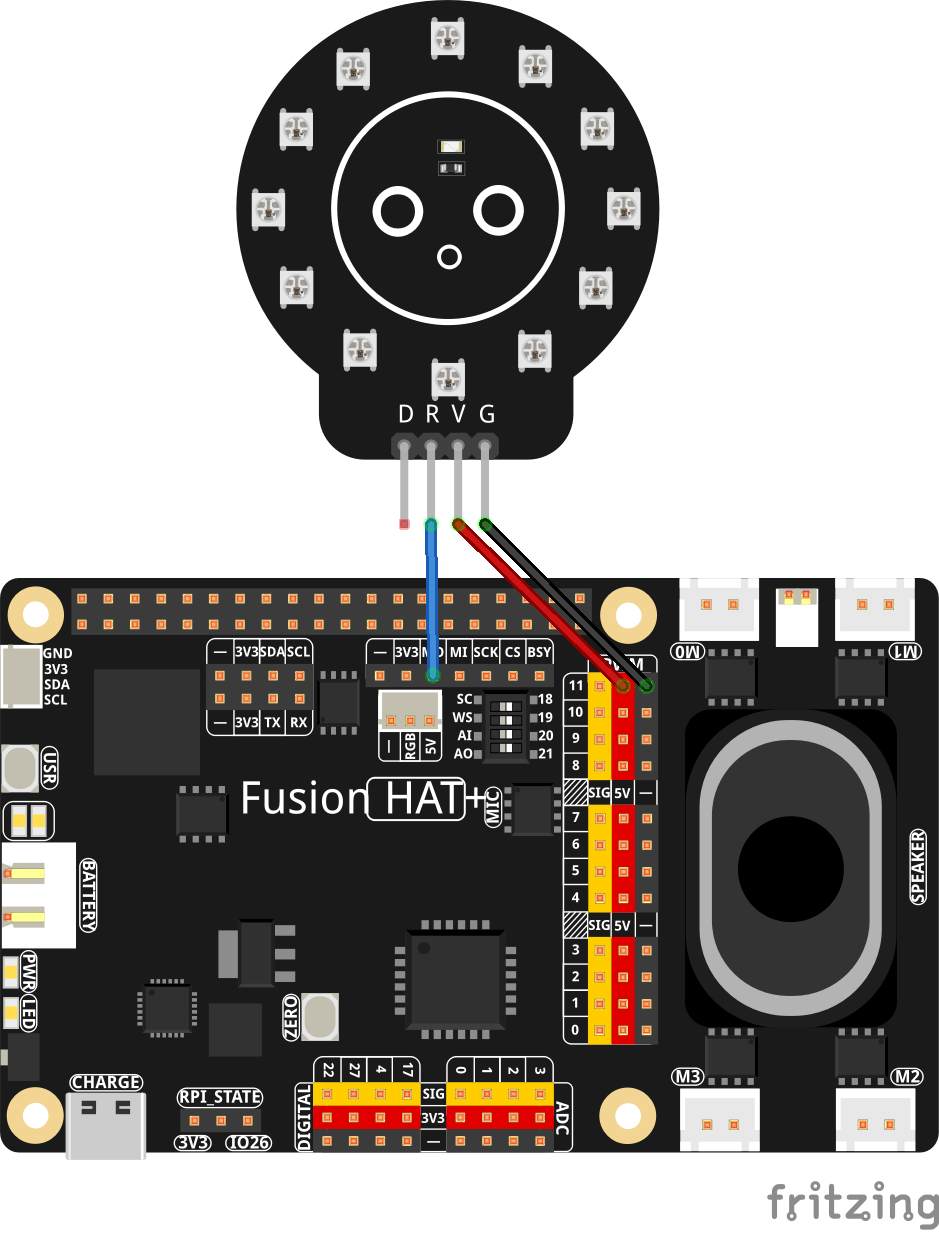
import board
import neopixel_spi as neopixel
from picamera2 import Picamera2
import mediapipe as mp
# ==============================================================================
# HARDWARE & NEOPIXEL INITIALIZATION
# ==============================================================================
# Initialize SPI communication bus for high-speed LED control
spiBus = board.SPI()
# Total number of physical LEDs in the circular NeoPixel ring
ledCount = 12
# Color order setting required by NeoPixel hardware (Green-Red-Blue)
pixelOrder = neopixel.GRB
# Create the SPI NeoPixel strip object, disabling auto-write for manual updates
ledStrip = neopixel.NeoPixel_SPI(spiBus, ledCount, pixel_order=pixelOrder, auto_write=False)
# Clear any previous LED states by turning all physical pixels off initially
ledStrip.fill(0)
ledStrip.show()
print("✅ NeoPixel initialized!")
# Boolean array tracking the active power state (True = On / False = Off) for each LED
ledStates = [False] * 12
# Array tracking the active RGB color for each physical LED to sync with screen drawing
currentLedRgb = [(0, 0, 0)] * 12
# Static base RGB color mapping assigned to each individual LED index
ledColors = [
(255, 0, 0), # LED 0: Red
(0, 255, 0), # LED 1: Green
(0, 0, 255), # LED 2: Blue
(0, 255, 255), # LED 3: Cyan
(255, 0, 255), # LED 4: Magenta
(255, 255, 0), # LED 5: Yellow
(255, 100, 0), # LED 6: Orange
(128, 0, 255), # LED 7: Purple
(0, 255, 128), # LED 8: Spring Green
(255, 0, 128), # LED 9: Pink
(128, 255, 0), # LED 10: Chartreuse
(0, 128, 255) # LED 11: Light Blue
]
# ==============================================================================
# LIGHTING MODES & STATE TRACKING
# ==============================================================================
# Available animation profiles selectable from the UI panel
modes = ["Static", "Rainbow", "Pulsate", "Blink", "Running Rainbow"]
# Index tracker for the active lighting mode
currentMode = 0
# Math phase tracker used for calculating brightness modulation in Pulsate mode
pulsePhase = 0
# Degree offset tracker used for rotating hue spectrums in Rainbow modes
rainbowOffset = 0
# Degree offset for frame-by-frame 1-degree hue increment
runningHueOffset = 0
# ==============================================================================
# DEBOUNCE & GESTURE LATCHING CONTROL FLAGS
# ==============================================================================
# Stateful latch flag to require full gesture release before accepting new toggles.
# This prevents rapid re-triggering (blinking) when holding a pinch over a node.
isGestureActive = False
# ==============================================================================
# PICAMERA2 & MEDIAPIPE HAND TRACKING SETUP
# ==============================================================================
# Instantiate PiCamera2 object targeting camera device 1
piCam = Picamera2(1)
# Screen resolution settings matching camera stream aspect ratio
frameWidth = 1280
frameHeight = 720
# Configure preview window resolution and color stream formatting
piCam.preview_configuration.main.size = (frameWidth, frameHeight)
piCam.preview_configuration.main.format = "RGB888"
piCam.preview_configuration.controls.FrameRate = 60
piCam.preview_configuration.align()
piCam.configure("preview")
piCam.start()
# Load MediaPipe hand detection module components
mpHands = mp.solutions.hands
handsDetector = mpHands.Hands(
model_complexity=1,
min_detection_confidence=0.7,
min_tracking_confidence=0.7,
max_num_hands=1
)
mpDraw = mp.solutions.drawing_utils
# Visual overlay center coordinate and radius for rendering the circular LED ring
centerX = frameWidth // 2
centerY = frameHeight // 2
ringRadius = 220
cv2.namedWindow("NeoPixel Ring Controller",cv2.WINDOW_GUI_NORMAL)
cv2.moveWindow("NeoPixel Ring Controller",0,65)
cv2.resizeWindow("NeoPixel Ring Controller",frameWidth,frameHeight)
# ==============================================================================
# MAIN APPLICATION LOOP
# ==============================================================================
while True:
# Capture raw frame matrix from PiCamera stream
frameData = piCam.capture_array()
# Mirror preview display horizontally and vertically to match natural orientation
frameData = cv2.flip(frameData, -1)
frameData = cv2.flip(frameData, 1)
# Convert image format from BGR to RGB required by MediaPipe
rgbFrame = cv2.cvtColor(frameData, cv2.COLOR_BGR2RGB)
# Execute hand keypoint extraction on the converted frame
trackingResults = handsDetector.process(rgbFrame)
# Create image copy dedicated for drawing visual UI overlays
displayFrame = frameData.copy()
# Capture current UNIX epoch timestamp for time-based animation calculations
currentTime = time.time()
# Flag tracking whether a valid action gesture occurred in the current frame
gestureTriggeredThisFrame = False
# Process hand gesture logic if hand landmarks are detected
if trackingResults.multi_hand_landmarks:
for handLandmarks in trackingResults.multi_hand_landmarks:
# Draw skeletal connections over the detected hand on display image
mpDraw.draw_landmarks(displayFrame, handLandmarks, mpHands.HAND_CONNECTIONS)
# Extract full list of 3D spatial points for all key joints
landmarksList = handLandmarks.landmark
indexTipPoint = landmarksList[8] # Joint landmark index 8 (Index finger tip)
thumbTipPoint = landmarksList[4] # Joint landmark index 4 (Thumb tip)
# Map coordinates from normalized values (0-1) to pixel dimensions
indexPixelX = int(indexTipPoint.x * frameWidth)
indexPixelY = int(indexTipPoint.y * frameHeight)
thumbPixelX = int(thumbTipPoint.x * frameWidth)
thumbPixelY = int(thumbTipPoint.y * frameHeight)
# Calculate Euclidean distance between index tip and thumb tip in pixels
pinchDistance = np.hypot(indexPixelX - thumbPixelX, indexPixelY - thumbPixelY)
# Check pointing interaction against every LED position along the circle
for ledIdx in range(12):
# Angle formula: Starts at +pi/2 (bottom) and rotates clockwise (- direction)
polarAngle = (np.pi / 2) - ledIdx * (2 * np.pi / 12)
# Derive 2D screen positions matching physical ring layout
ledPixelX = int(centerX + ringRadius * np.cos(polarAngle))
ledPixelY = int(centerY + ringRadius * np.sin(polarAngle))
# Compute straight-line Euclidean distance between index finger and target LED
pointDistance = np.hypot(indexPixelX - ledPixelX, indexPixelY - ledPixelY)
# Determine if fingertip is hovering within interaction radius of an LED point (Relaxed to 60px)
if pointDistance < 60:
# Highlight active target LED with concentric indicator rings
cv2.circle(displayFrame, (ledPixelX, ledPixelY), 38, (0, 255, 255), 6)
cv2.circle(displayFrame, (ledPixelX, ledPixelY), 22, (255, 255, 100), -1)
# Verify pinch condition (Relaxed to 55px threshold for easier detection)
if pinchDistance < 55:
gestureTriggeredThisFrame = True
# Draw pinch visual feedback ring connecting index and thumb
cv2.circle(displayFrame, (indexPixelX, indexPixelY), 15, (0, 255, 0), -1)
# Execute state change only if the gesture was not already latched
if not isGestureActive:
# Invert boolean state for selected LED
ledStates[ledIdx] = not ledStates[ledIdx]
# Lock gesture activation state until user unpinches
isGestureActive = True
# Process UI mode panel interaction if pointing inside designated top-right screen area
if indexPixelX > frameWidth - 280:
if indexPixelY < 420:
# Map vertical pixel coordinate directly to corresponding mode list index
modeIndexChoice = (indexPixelY - 80) // 70
# Verify target index falls within valid bounds of the mode selection list
if 0 <= modeIndexChoice < len(modes):
# Verify pinch condition to confirm mode selection (Relaxed to 55px)
if pinchDistance < 55:
gestureTriggeredThisFrame = True
# Draw pinch visual feedback ring connecting index and thumb
cv2.circle(displayFrame, (indexPixelX, indexPixelY), 15, (0, 255, 0), -1)
# Execute mode switch only if the gesture was not already latched
if not isGestureActive:
currentMode = modeIndexChoice
# Lock gesture activation state until user unpinches
isGestureActive = True
# Reset latch flag when hand gesture is unpinched or moved off targets
if not gestureTriggeredThisFrame:
isGestureActive = False
# ==========================================================================
# DYNAMIC LIGHTING ANIMATION EFFECTS & HARDWARE COLOR UPDATES
# ==========================================================================
# MODE 0: Static colors assigned directly from preset ledColors palette
if currentMode == 0:
for ledIdx in range(12):
if ledStates[ledIdx]:
currentLedRgb[ledIdx] = ledColors[ledIdx]
if not ledStates[ledIdx]:
currentLedRgb[ledIdx] = (0, 0, 0)
# MODE 1: Fixed rainbow distribution (Red at LED 0, stepping by 30 degrees, static)
if currentMode == 1:
for ledIdx in range(12):
if ledStates[ledIdx]:
calculatedHue = ledIdx * 30 # 360 degrees / 12 LEDs = 30 degrees per step
redVal, greenVal, blueVal = [int(channel * 255) for channel in colorsys.hsv_to_rgb(calculatedHue / 360.0, 1, 1)]
currentLedRgb[ledIdx] = (redVal, greenVal, blueVal)
if not ledStates[ledIdx]:
currentLedRgb[ledIdx] = (0, 0, 0)
# MODE 2: Pulsating brightness modulation (squared sine wave for true black floor fade)
if currentMode == 2:
pulsePhase += 0.15
calculatedBrightness = ((np.sin(pulsePhase) + 1) / 2) ** 2
for ledIdx in range(12):
if ledStates[ledIdx]:
baseRed, baseGreen, baseBlue = ledColors[ledIdx]
currentLedRgb[ledIdx] = (
int(baseRed * calculatedBrightness),
int(baseGreen * calculatedBrightness),
int(baseBlue * calculatedBrightness)
)
if not ledStates[ledIdx]:
currentLedRgb[ledIdx] = (0, 0, 0)
# MODE 3: Blinking on/off light strobe animation
if currentMode == 3:
blinkToggleState = int(currentTime * 3) % 2
for ledIdx in range(12):
if ledStates[ledIdx]:
if blinkToggleState:
currentLedRgb[ledIdx] = ledColors[ledIdx]
if not blinkToggleState:
currentLedRgb[ledIdx] = (0, 0, 0)
if not ledStates[ledIdx]:
currentLedRgb[ledIdx] = (0, 0, 0)
# MODE 4: Evenly-spaced rainbow incrementing 1 degree per cycle
if currentMode == 4:
for ledIdx in range(12):
if ledStates[ledIdx]:
# Start at evenly spaced base angle (30 deg apart) and add 1-degree step offset
calculatedHue = (ledIdx * 30 + runningHueOffset) % 360
# Convert normalized float hue (0.0 to 1.0) to RGB
rFloat, gFloat, bFloat = colorsys.hsv_to_rgb(calculatedHue / 360.0, 1.0, 1.0)
currentLedRgb[ledIdx] = (
int(round(rFloat * 255)),
int(round(gFloat * 255)),
int(round(bFloat * 255))
)
if not ledStates[ledIdx]:
currentLedRgb[ledIdx] = (0, 0, 0)
# Increment offset by exactly 1 degree each frame cycle, wrapping 360 back to 0
runningHueOffset = (runningHueOffset + 2) % 360
# Push all updated mode colors out to physical NeoPixel hardware strip
for ledIdx in range(12):
ledStrip[ledIdx] = currentLedRgb[ledIdx]
ledStrip.show()
# ==========================================================================
# ON-SCREEN GRAPHICAL RENDERING (LED RING MATCHING PHYSICAL HARDWARE)
# ==========================================================================
for ledIdx in range(12):
# Angle formula: Starts at +pi/2 (bottom) and rotates clockwise (- direction)
polarAngle = (np.pi / 2) - ledIdx * (2 * np.pi / 12)
targetX = int(centerX + ringRadius * np.cos(polarAngle))
targetY = int(centerY + ringRadius * np.sin(polarAngle))
# Render illuminated state representation using exact active hardware color
if ledStates[ledIdx]:
# Extract current RGB hardware values
redVal, greenVal, blueVal = currentLedRgb[ledIdx]
# Convert RGB tuple to BGR tuple format required by OpenCV rendering
openCvBgrColor = (blueVal, greenVal, redVal)
# Draw illuminated circle matching active physical LED color
cv2.circle(displayFrame, (targetX, targetY), 24, openCvBgrColor, -1)
cv2.circle(displayFrame, (targetX, targetY), 31, (255, 255, 255), 4)
# Render dimmed inactive state representation if turned off
if not ledStates[ledIdx]:
cv2.circle(displayFrame, (targetX, targetY), 20, (50, 50, 50), -1)
cv2.circle(displayFrame, (targetX, targetY), 27, (90, 90, 90), 3)
# Draw LED index numerical labels inside each visual circle node
cv2.putText(
displayFrame, str(ledIdx), (targetX - 9, targetY + 7),
cv2.FONT_HERSHEY_SIMPLEX, 0.7, (255, 255, 255), 2
)
# ==========================================================================
# ON-SCREEN GRAPHICAL RENDERING (MODE SELECTION PANEL)
# ==========================================================================
panelPositionX = frameWidth - 260
for modeIdx, modeName in enumerate(modes):
panelPositionY = 80 + modeIdx * 70
# Default unselected button background color in BGR (Dark Gray)
highlightColor = (100, 100, 100)
# Override background color with vibrant Blue in BGR format when mode is selected
if modeIdx == currentMode:
highlightColor = (255, 100, 0)
# Draw background menu card rectangle
cv2.rectangle(displayFrame, (panelPositionX, panelPositionY), (panelPositionX + 240, panelPositionY + 60), highlightColor, -1)
# Draw outer border line around menu card rectangle
cv2.rectangle(displayFrame, (panelPositionX, panelPositionY), (panelPositionX + 240, panelPositionY + 60), (255, 255, 255), 3)
# Render string name for lighting mode into menu card
cv2.putText(
displayFrame, modeName, (panelPositionX + 20, panelPositionY + 40),
cv2.FONT_HERSHEY_SIMPLEX, 0.75, (255, 255, 255), 2
)
# ==========================================================================
# INSTRUCTION OVERLAYS & WINDOW MANAGEMENT
# ==========================================================================
cv2.putText(
displayFrame, "Point + Pinch = Toggle LED", (30, frameHeight - 40),
cv2.FONT_HERSHEY_SIMPLEX, 0.7, (0, 255, 255), 2
)
cv2.putText(
displayFrame, "Point Right Panel + Pinch = Select Mode", (30, frameHeight - 80),
cv2.FONT_HERSHEY_SIMPLEX, 0.65, (200, 200, 200), 2
)
# Render completed frame to OpenCV GUI window
cv2.imshow("NeoPixel Ring Controller", displayFrame)
# Read user keypress events (Wait for 1 millisecond)
activeKey = cv2.waitKey(1) & 0xFF
# Process exit program trigger if 'q' key is pressed
if activeKey == ord('q'):
break
# Process reset/clear trigger if 'c' key is pressed
if activeKey == ord('c'):
ledStates = [False] * 12
currentLedRgb = [(0, 0, 0)] * 12
ledStrip.fill(0)
ledStrip.show()
# ==============================================================================
# CLEANUP & SHUTDOWN PROCEDURES
# ==============================================================================
print('Program Terminated')
# Close open OpenCV GUI windows
cv2.destroyAllWindows()
# Ensure all physical NeoPixels are safely powered off on exit
ledStrip.fill(0)
ledStrip.show()