In today’s lesson, we’re going to make a huge leap forward in giving our Raspberry Pi some real personality. We’re going to teach it how to talk using Text-to-Speech (TTS). Instead of just blinking LEDs or printing text to the screen, our Pi will now speak out loud with a clear, natural-sounding voice.
This is a really fun and important lesson because one of the main goals of this class is to build intelligent systems that can interact with us in more human ways. Being able to make your Raspberry Pi speak opens up all kinds of exciting possibilities — whether you want your robot to tell you what it sees, have your AI assistant read sensor data out loud, or just add some personality and humor to your projects.
In this video, I show you how to use the TTS capabilities on the SunFounder Fusion AI Hat. You’ll learn how to install and set up the TTS engine, speak simple sentences, change voices, and control when the Pi talks. We’ll also look at how to make the speech sound more natural and how to integrate it smoothly into your programs without freezing everything else.
By the end of this lesson, your Raspberry Pi will be able to speak clearly and confidently — which is going to make the rest of our AI on the Edge journey a lot more exciting. Voice output combined with voice input (which we’ll work on soon) is what turns a simple circuit into a real interactive AI companion.
So go ahead and grab your Fusion AI Hat, plug in a speaker, and let’s give your Raspberry Pi a voice! As always, I encourage you to code along with me in the video and then experiment. Try making it say funny things, read temperatures, announce when it detects a face — whatever sparks your creativity.
This is where your projects start to feel truly alive.
I’m really excited for you on this one — let’s make your Raspberry Pi talk!
This is the schematic we are using on these projects;
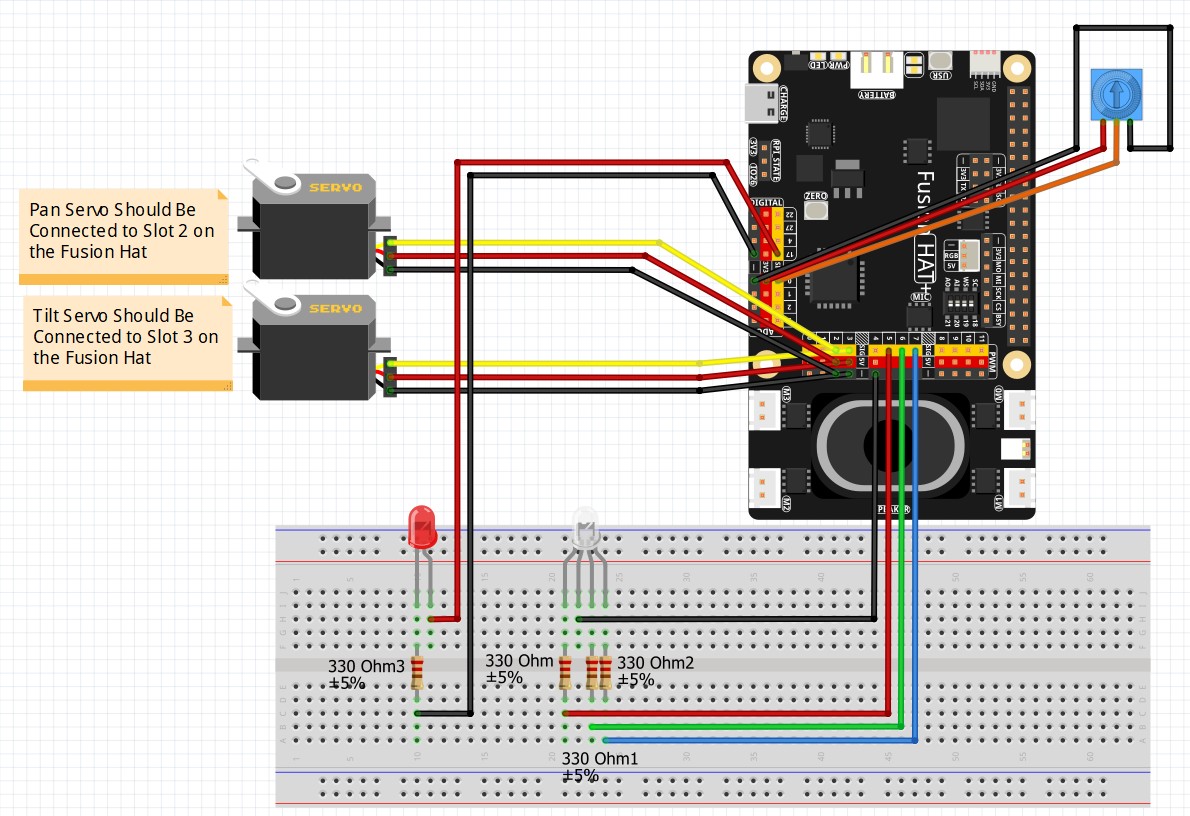
This Schematic is explained in detail in LESSON #5.
Then this is the code we developed in today’s lesson.
|
1 2 3 4 5 6 7 8 9 10 11 12 13 14 15 16 17 18 19 20 21 22 23 24 25 26 27 28 29 30 31 32 33 34 35 36 37 38 39 40 41 42 43 44 45 46 47 48 49 50 51 52 53 54 55 56 57 58 59 60 61 62 63 64 65 66 |
# ==================================================================== # DISCLAIMER: # This code is provided as-is for educational and experimental # purposes only. The author makes no representations or warranties of # any kind concerning the safety, suitability, or accuracy of this # code. Use at your own risk. The author assumes no liability for any # damages, system failures, security breaches, or network issues # resulting from the use or implementation of this script. # ==================================================================== from fusion_hat.adc import ADC from fusion_hat.pwm import PWM from fusion_hat.tts import Piper from time import sleep tts = Piper() tts.set_model('en_US-amy-low') potPin = 0 myPot = ADC(potPin) redPin = 5 redLED = PWM(redPin) rangeOld = 100 while True: potVal = myPot.read() writeVal=100*(potVal/4095) - .005 if writeVal < 1: msg = "Your LED is Off" range = 0 if writeVal >=1 and writeVal<10: msg = "Your LED is Brightness 1" range = 1 if writeVal >=10 and writeVal<20: msg = "Your LED is Brightness 2" range=2 if writeVal >=20 and writeVal<30: msg = "Your LED is Brightness 3" range=3 if writeVal >=30 and writeVal<40: msg = "Your LED is Brightness 4" range=4 if writeVal >=40 and writeVal<50: msg = "Your LED is Brightness 5" range=5 if writeVal >=50 and writeVal<60: msg = "Your LED is Brightness 6" range=6 if writeVal >=60 and writeVal<70: msg = "Your LED is Brightness 7" range=7 if writeVal >=70 and writeVal<80: msg = "Your LED is Brightness 8" range=8 if writeVal >=80 and writeVal<90: msg = "Your LED is Brightness 9" range=9 if writeVal >=90 and writeVal<99: msg = "Your LED is Brightness 10" range=10 if writeVal >=99: msg = "Your LED is full Brightness" range=11 if rangeOld != range: tts.say(msg, stream = False) rangeOld=range redLED.pulse_width_percent(int(writeVal)) sleep(.1) |