
Category Archives: Tutorial

Arduino Tutorial 36: Understanding How to Use Tilt Switches in Your Projects

Tilt Sensor
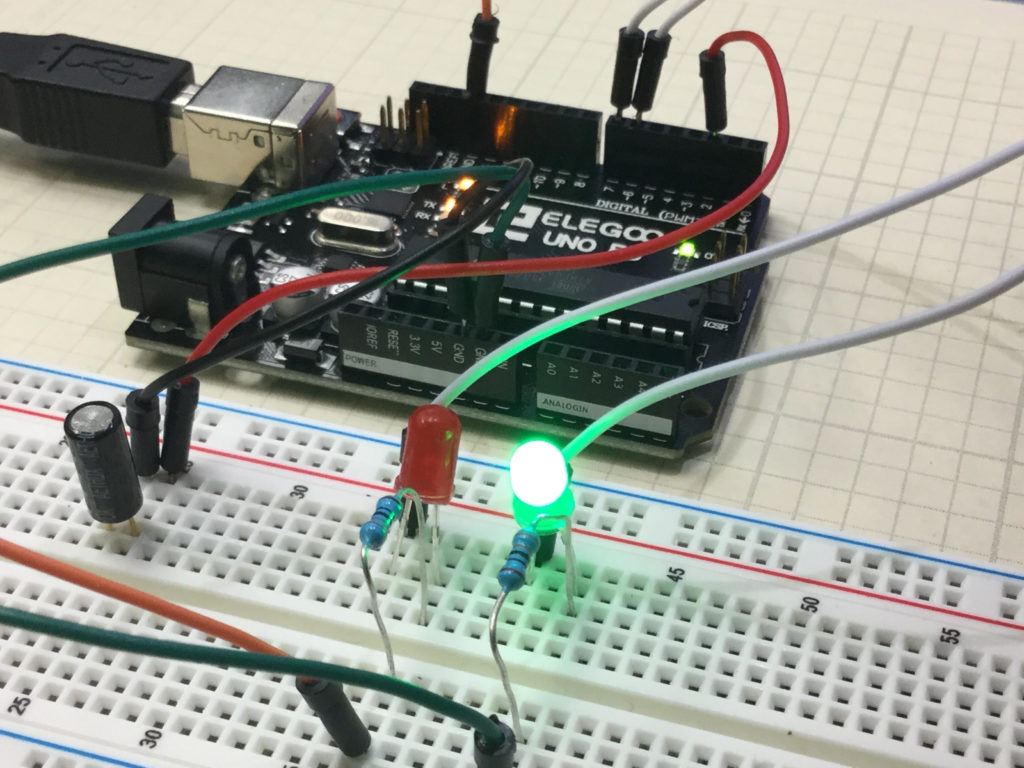
This Circuit Gives Visual Indicator if Board Has Been Tilted

This is a simple project that allows you to create a circuit which will give a visual indication if the breadboard has been tilted. In the upright position, the Green LED is illuminated. To the left of the board is a tilt switch. If the project is tilted, the switch will go from the closed to the open condition. This can be detected on the arduino, and then the red LED is illuminated. The video below explains how to do this simple project.

An official Arduino Uno R3 is available HERE. In this new series of lessons, I will be using the sensor and other components found in this KIT.

You should create your own code based on the instructions in the video, but if you are having trouble, I include the code developed in the video below:


Arduino Tutorial 35: Understanding How to Use a Stepper Motor

In this lesson we give you several examples of how to connect and program a stepper motor. Stepper motors are useful because they can produce very large torque at low RPM and are capable of extremely precise positioning. They are somewhat tricky to use, and you must be careful to not try and power them from an Arduino. Arduino can control stepper motors, but they must be powered from an external power supply.

If you want to follow along at home, an official Arduino Uno R3 is available HERE. In this new series of lessons, I will be using the sensor and other components found in this KIT.

This is the code that allows you to toggle the direction of the stepper motor by pressing a pushbutton. The video shows all the details and how to connect the motor up.


Arduino Tutorial 34: Simplest Way to Use a Pushbutton Switch

In this lesson we show you a quick hack that will allow you to incorporate a pushbutton switch into an Arduino project without having to use an external pullup resistor, and still get very stable operation. The trick is to create a digital input pin, which in our example is pin 2. We then digitalWrite that INPUT pin HIGH. What that does is put an internal pullup resistor on pin 2, and then connects it to 5 volts. In effect, we are using a clever command to use the Arduino’s internal pullup resistors. The code below is what we used in the video. Enjoy!

An official Arduino Uno R3 is available HERE. In this new series of lessons, I will be using the sensor and other components found in this KIT.

Arduino Tutorial 33: Understanding How to Control Servos with a Joystick

In this lesson we show you how to precisely control the position of two servos using a joystick. We derive the math equations which will allow you to get smooth and precise control of the servo. We also add a buzzer to the project to create an audible alarm when the button the joystick is pressed.

If you want to follow along at home, an official Arduino Uno R3 is available HERE. In this new series of lessons, I will be using the sensor and other components found in this KIT.

Typically, the servos in electronics kits are not the best ones, but are suitable to learn with. If you want a more stable and better quality servo, this is the one I user in more of my projects: HiTEC

Below is the code we developed in this project.


Arduino Tutorial 32: Understanding and Using Joysticks in a Project

In this lesson we will explain how to hook up a Joystick. The easiest way to think of a joystick is to think of it as two independent potentiometer. Moving the joystick left and right changes one potentiometer, and moving the joystick up and down changes the other potentiometer. Also, pressing the knob on the joystick will activate a simple on/off switch. In this video we show you how to hook the joystick up, and then show you code that will allow you to read from the potentiometers and the switch.

If you want to follow along at home, an official Arduino Uno R3 is available HERE. In this new series of lessons, I will be using the sensor and other components found in this KIT.

Typically, the servos in electronics kits are not the best ones, but are suitable to learn with. Heads up that in Lesson 33 we will be using a joystick to control two servos.  If you want to get ready for that lesson, go ahead and order your  HiTEC Servos.

This is the code that we developed in the video above.