
In this video lesson we show how to create a simple project where the Raspberry Pi Pico W is connected to a DHT11 temperature and humidity sensor. The Pico measures the temperature and humidity from the sensor, and then displays it both on the Computer Screen, and on the LCD display we have connected to the Pico. The display toggles between showing degrees C and degrees F via a pushbutton. The schematic for the circuit is shown below:
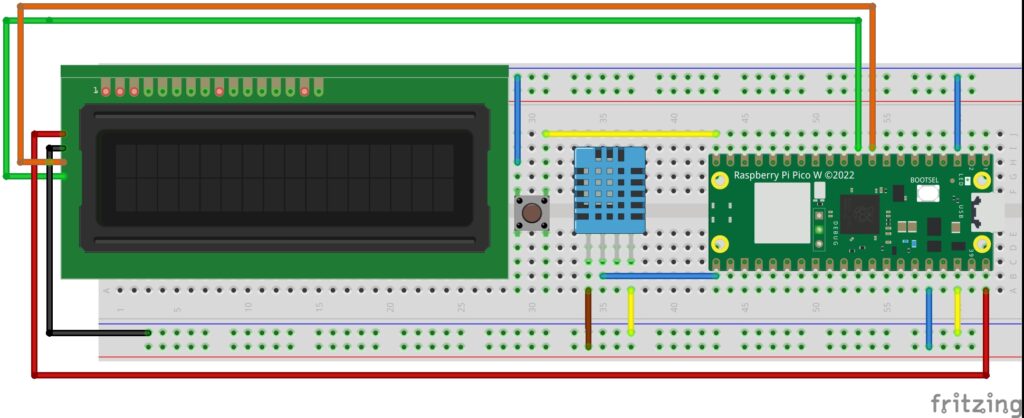
Below is the software we developed for this project. Note you must first install the LCD library, which we show how to do HERE.
|
1 2 3 4 5 6 7 8 9 10 11 12 13 14 15 16 17 18 19 20 21 22 23 24 25 26 27 28 29 30 31 32 33 34 35 36 37 38 39 40 41 42 43 44 45 46 47 48 |
# ==================================================================== # DISCLAIMER: # This code is provided as-is for educational and experimental # purposes only. The author makes no representations or warranties of # any kind concerning the safety, suitability, or accuracy of this # code. Use at your own risk. The author assumes no liability for any # damages, system failures, security breaches, or network issues # resulting from the use or implementation of this script. # ==================================================================== from machine import Pin import utime as time from dht import DHT11 from lcd1602 import LCD lcd=LCD() dataPin=16 myPin=Pin(dataPin,Pin.OUT,Pin.PULL_DOWN) sensor=DHT11(myPin) butPin=15 myButton=Pin(butPin,Pin.IN,Pin.PULL_UP) tempUnitC=True buttonState=1 buttonStateOld=1 print('My Sensor Data') while True: buttonState=myButton.value() if buttonStateOld==0 and buttonState==1: tempUnitC= not tempUnitC try: sensor.measure() except: pass tempC=sensor.temperature() tempF=tempC*9/5+32 hum=sensor.humidity() if tempUnitC==True: print("\r",'Temp= ',tempC,chr(176)+'C ', 'Humidity= ',hum,'%',end=' ') lcd.write(0,0,'Temp: '+str(tempC)+'\xDF'+'C ') lcd.write(0,1,"Humidity: "+str(hum)+'%') if tempUnitC==False: print("\r",'Temp= ',tempF,chr(176)+'F ', 'Humidity= ',hum,'%',end=' ') lcd.write(0,0,'Temp: '+str(tempF)+'\xDF'+'F') lcd.write(0,1,"Humidity: "+str(hum)+'%') ts=.1 time.sleep(ts) buttonStateOld=buttonState |