Jetson Xavier NX Lesson 7: Connecting and Controlling Servos

In this lesson we show you how to control a pan/tilt camera bracket with the NVIDIA Jetson Xavier NX. We go through the physical build of the bracket, how to connect the circuit, and then how to program the servos. We use the Adafruit circuitpython library, and show how to download and use the library. If you want to play along at home, you can pick the pan/tilt bracket and servos up HERE, and you can grab a couple of Raspberry Pi cameras HERE.

Below is the simple code for moving the servo using the Jetson Xavier NX:


ARDUINO TUTORIAL 68: Make a Remote Controlled RGB LED with Brightness and Color Control

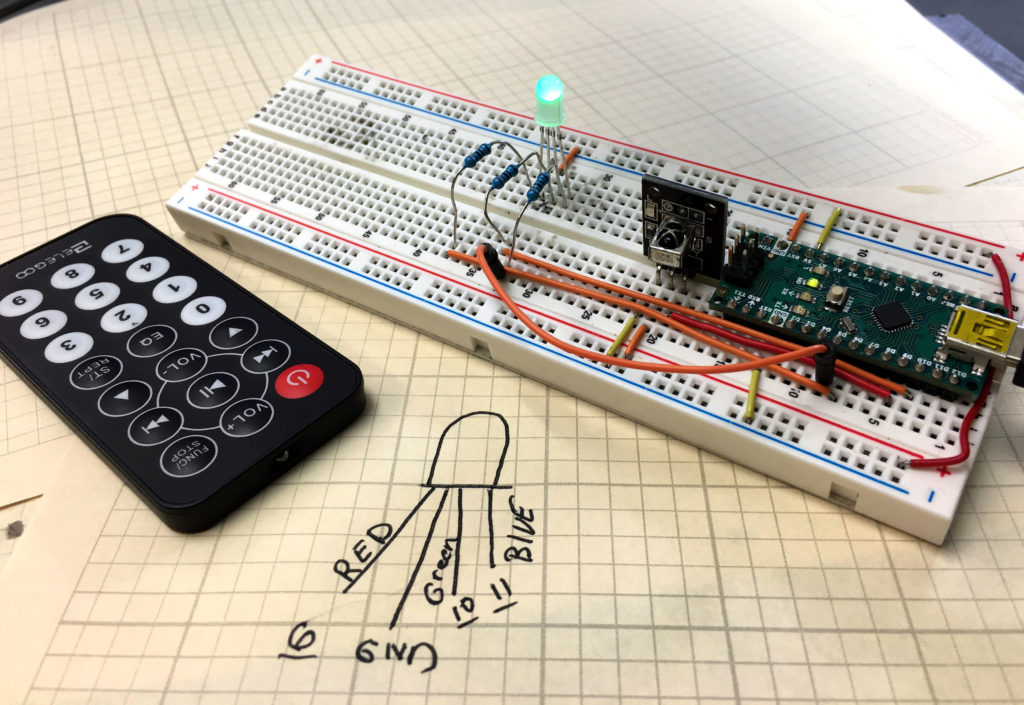
RGB LED Remote Control
This is our Remote Controlled RGB LED

In this lesson we take you through step-by-step instructions on creating a remotely controlled RGB LED.  This is the solution to the Homework Assignment given in Tutorial 68. It is important for you to try and complete this on your own before looking at my solutions.

We are building this with parts from our Elegoo Kit , and our actual build is using an Arduino Nano, which allows the project to be built on a single breadboard. You can get the neat jumper wires HERE.

This video steps you through our build.

Below is the code we developed in this video.

Jetson Xavier NX Lesson 6: Camera Gear and Setup for Future Lessons

In this lesson we discuss the future direction of this series, and the gear needed to move forward.

Moving forward, I will be running two pan/tilt servos for the raspberry pi cameras. I suggest buying the same gear HERE. I suggest purchasing two units.

Then, we also need two Version two raspberry pi cameras. I like the following ones, because they include a neat little acrylic case, and the long cable, which makes it work much better on the pan/tilt bracket. You can get the cameras HERE.

AI on the Jetson Nano Lesson 46: Synchronizing Multiple Cameras with OpenCV

In this lesson we learn how to use Python Classes, Methods and Threading to run two cameras in OpenCV without latency or synchronization problems.  Below we include the code developed in the video above.


Making The World a Better Place One High Tech Project at a Time. Enjoy!