
In this video lesson, we show how to create a dimmable LED on the raspberry pi using a potentiometer. Below is the schematic of the circuit we will be using.
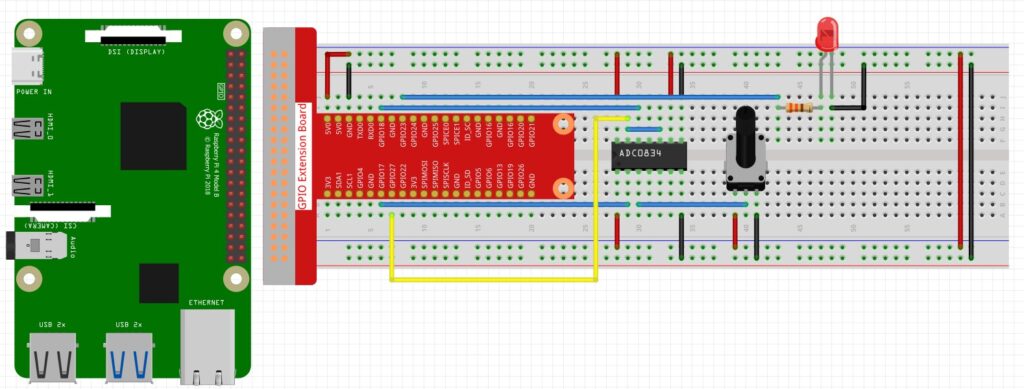
Then we used the following code to read values through the ADC0834 analog to digital chip, and then apply a PWM signal to control the brightness of the LED.
|
1 2 3 4 5 6 7 8 9 10 11 12 13 14 15 16 17 18 19 20 21 22 23 24 25 26 27 28 29 30 31 32 |
# ==================================================================== # DISCLAIMER: # This code is provided as-is for educational and experimental # purposes only. The author makes no representations or warranties of # any kind concerning the safety, suitability, or accuracy of this # code. Use at your own risk. The author assumes no liability for any # damages, system failures, security breaches, or network issues # resulting from the use or implementation of this script. # ==================================================================== import RPi.GPIO as GPIO import ADC0834 import time GPIO.setmode(GPIO.BCM) LEDPin=23 GPIO.setup(LEDPin,GPIO.OUT) myPWM=GPIO.PWM(LEDPin,1000) myPWM.start(0) ADC0834.setup() try: while True: analogVal=ADC0834.getResult(0) print('Raw= ',analogVal, 'Vol= ', analogVal/255*5) DC=analogVal*100/255 myPWM.ChangeDutyCycle(DC) time.sleep(.2) except KeyboardInterrupt: GPIO.cleanup() print('GPIO Good to Go') |